Observability
SimpleW provides built-in observability through OpenTelemetry, the open standard for distributed tracing, metrics, and logs.
Telemetry in SimpleW is opt-in and lightweight by design. When enabled, the server automatically emits :
- Traces for each HTTP request lifecycle
- Metrics for request/response counts and durations
- Rich context (request, response, routing, exceptions)
This allows SimpleW to integrate seamlessly with any OpenTelemetry-compatible backend (Uptrace, Jaeger, Tempo, Datadog, etc.).
Telemetry Overview
When telemetry is enabled, SimpleW automatically :
- Starts a server span per HTTP request
- Enriches spans with HTTP, network, routing, and client metadata
- Emits metrics using OpenTelemetry
Meter - Exposes a hook to customize or override telemetry tags
Telemetry is based on :
System.Diagnostics.ActivitySystem.Diagnostics.Metrics- OpenTelemetry semantic conventions
Excluding individual requests
Call session.Response.DisableTelemetry() before sending a response to exclude the current exchange from SimpleW HTTP traces and request/response metrics. For example, exclude a health endpoint in middleware:
server.UseMiddleware(async (session, next) => {
    if (session.Request.Path == "/health") {
        session.Response.DisableTelemetry();
    }
    await next();
});

server.MapGet("/health", () => "OK");
Logs remain enabled. The setting resets for the next request, including on a keep-alive connection, and leaves the server telemetry configuration unchanged. Call it as early as possible: measurements or listener notifications already emitted cannot be retracted. This controls SimpleW HTTP telemetry, not application-created spans or addon-specific meters.
See HttpResponse.DisableTelemetry().
Telemetry Flow
Incoming request
      |
      v
SimpleW request pipeline
      |
      +--> create trace span (Activity)
      |
      +--> record metrics (Meter)
      |
      +--> attach tags
      |    (http, route, network, errors, instance)
      |
      v
OpenTelemetry exporter
      |
      v
Backend
(Uptrace, Jaeger, Tempo, Datadog, ...)
Traces
The most reliable approach is to leverage battle-tested solutions for collecting and managing telemetry data.
The team behind Uptrace has built an impressive open-source, self-hosted observability platform. They offer a helper extension for the .NET OpenTelemetry exporter as a NuGet package, making it effortless to integrate end-to-end tracing into your .NET services.
Then add the official OpenTelemetry package
dotnet add package OpenTelemetry.Exporter.OpenTelemetryProtocolAnd see the following example, especially the openTelemetryObserver()
using System;
using System.Net;
using System.Diagnostics;
using OpenTelemetry;
using OpenTelemetry.Exporter;
using OpenTelemetry.Metrics;
using OpenTelemetry.Resources;
using OpenTelemetry.Trace;
using SimpleW;

namespace Sample {
    class Program {

        private static TracerProvider? _tracerProvider;
        private static MeterProvider? _meterProvider;

        static async Task Main() {

            // subscribe to all SimpleW events
            openTelemetryObserver("SimpleW*");

            var server = new SimpleWServer(IPAddress.Any, 2015);

            // configure and enable telemetry
            server.ConfigureTelemetry(options => options.Enabled = true);

            server.MapControllers<Controller>("/api");

            await server.RunAsync();
        }

        static void openTelemetryObserver(string source) {
            _tracerProvider = Sdk.CreateTracerProviderBuilder()
                                 .AddSource(source)
                                 //.SetSampler(new ParentBasedSampler(new TraceIdRatioBasedSampler(10.0)))
                                 .AddOtlpExporter((options) => {
                                     options.Endpoint = new Uri("https://api.uptrace.dev/v1/traces");
                                     options.Headers = "uptrace-dsn=APIKEY";
                                     options.Protocol = OtlpExportProtocol.HttpProtobuf;
                                 })
                                 .SetResourceBuilder(ResourceBuilder.CreateEmpty().AddService(serviceName: "Example", serviceVersion: "0.1"))
                                 .Build();

            _meterProvider = Sdk.CreateMeterProviderBuilder()
                                .AddMeter(source)
                                .SetResourceBuilder(ResourceBuilder.CreateEmpty().AddService(serviceName: "Example", serviceVersion: "0.1"))
                                .AddOtlpExporter((exporterOptions, metricReaderOptions) => {
                                    exporterOptions.Endpoint = new Uri("https://api.uptrace.dev/v1/metrics");
                                    exporterOptions.Headers = "uptrace-dsn=APIKEY";
                                    exporterOptions.Protocol = OtlpExportProtocol.HttpProtobuf;
                                    metricReaderOptions.TemporalityPreference = MetricReaderTemporalityPreference.Delta;
                                })
                                .Build();
        }

    }

    public class SomeController : Controller {
        [Route("GET", "/test")]
        public object SomePublicMethod() {
            return new {
                message = "Hello World !"
            };
        }
    }

}
That’s it. Every HTTP request handled by SimpleW is now fully traced.
NOTE
Use OtlpExportProtocol.HttpProtobuf with .NET OpenTelemetry Exporter because the Grpc version is buggy.
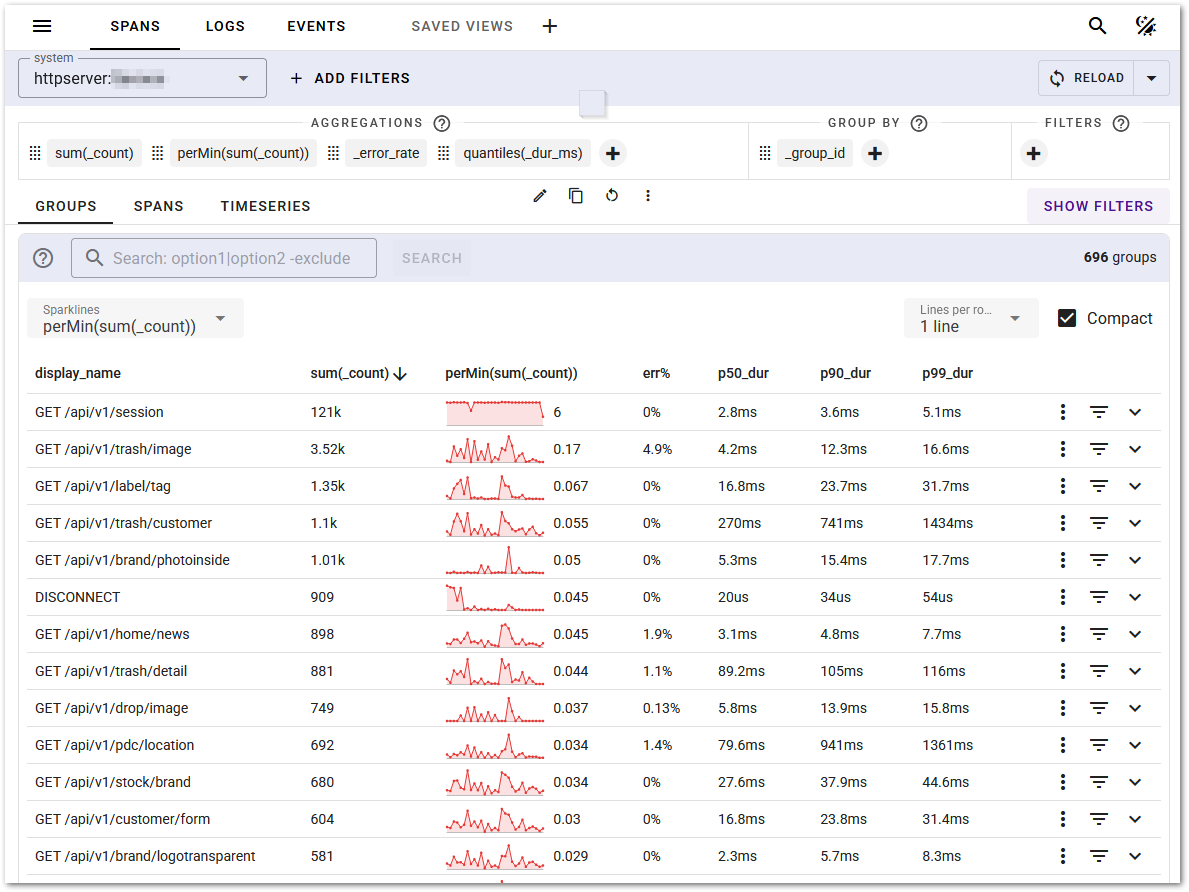
A screenshot of Uptrace Traces & Logs
Metrics
When telemetry is enabled, SimpleW emits standard HTTP server metrics using OpenTelemetry Meter, including :
- Request count
- Response count
- Request duration
- Response duration
- Session count
These metrics can be scraped or collected by any OpenTelemetry-compatible metrics backend (Prometheus, Uptrace, etc.).
Telemetry Per Instance
When running multiple instances of SimpleW (for example behind a load balancer, in containers, or as multiple processes on the same host), telemetry in SimpleW is per instance by design.
Each SimpleW instance maintains its own :
- ActivitySource
- Meter
- Runtime context
This means that without explicit configuration, multiple instances may appear indistinguishable in your observability backend.
Important : Configure InstanceId
When multiple instances are running, it is strongly recommended to set TelemetryOptions.InstanceId. The InstanceId is automatically attached to all emitted traces and metrics, allowing you to :
- Distinguish instances in traces and metrics
- Debug instance-specific issues
- Correlate performance or errors to a specific node
Example
server.ConfigureTelemetry(options => {
    options.Enabled = true;
    options.InstanceId = Environment.MachineName;
});
You may also use :
- A container ID
- A pod name
- A unique GUID per process
server.ConfigureTelemetry(options => {
    options.Enabled = true;
    options.InstanceId = Guid.NewGuid().ToString();
});
NOTE
If InstanceId is not set, telemetry remains functional but instance-level correlation becomes difficult or impossible when multiple SimpleW instances are running.
Telemetry Customization
When generating traces and metrics, SimpleW collects metadata from the request and connection. In some environments (behind a reverse proxy), you may want to override or enrich telemetry tags.
You can do this using SimpleWServer.ConfigureTelemetry()
Example : Trusting Reverse Proxy Headers
// configure telemetry
server.ConfigureTelemetry(options => {
    options.Enabled = true;
    options.IncludeStackTrace = true;
    options.EnrichWithHttpSession = (activity, session) => {
        // override host with the X-Forwarded-Host header (set by a trusted reverse proxy)
        if (session.Request.Headers.TryGetValue("X-Forwarded-Host", out string? host)) {
            activity.SetTag("url.host", host);
        }
    };
});
This hook runs after the response is generated and allows full access to :
- The active
Activity - The complete
HttpSession
NOTE
As headers can be forged on the client side, you should only accept X-Headers if the underlying reverse proxy is under your control and configured with a proper header policy.
Custom Client IP Resolution
By default, SimpleW determines the client IP address directly from the session remote endpoint (HttpSession.RemoteEndPoint).
To support these scenarios, SimpleW allows you to fully customize how the client IP address is resolved by configuring a custom ClientIpResolver.
You can override this behavior using ConfigureClientIPResolver :
server.ConfigureClientIPResolver(session => {

    // 1. look for any X-Real-IP header (note: you should check this value come from a trust proxy)
    if (session.Request.Headers.TryGetValue("X-Real-IP", out string? xRealIp) && xRealIp != null) {
        return IPAddress.Parse(xRealIp);
    }

    // 2. client ip (fallback)
    if (session.RemoteEndPoint is not IPEndPoint ep) {
        return null;
    }
    return ep.Address;
});