
FileBrowser


The SimpleW.Service.FileBrowser package provides a web file browser and chunked upload module for SimpleW.
It exposes a ready-to-use browser UI and an HTTP API to list files and directories, create folders, rename or move entries, move entries to a trash directory, and upload complete directory trees.
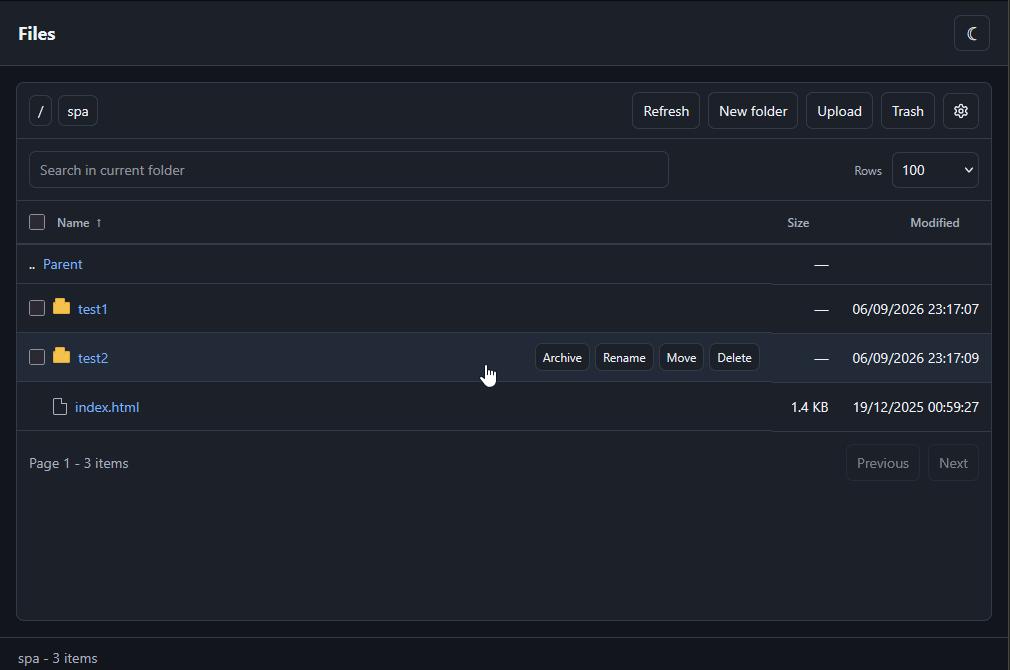
Features
- Browse files and directories below a configured root
- Calculate and copy SHA-256, SHA-1, or MD5 checksums for individual files
- Create folders, rename entries, and move files or directories
- Move one or more entries to an internal trash directory, then restore or permanently delete them
- Create ZIP archives and extract ZIP or RAR archives, including supported multipart RAR volumes
- Upload files and directory trees
- Split large files into configurable chunks
- Execute file mutations asynchronously through an in-process queue
- Publish operation and upload progress through Server-Sent Events
- Optionally watch external disk changes and refresh connected browsers automatically
- Serve the UI from embedded DLL resources, a Debug source directory, or a custom directory
- Reject path traversal and hide internal trash and temporary upload directories
Requirements
- .NET 8.0, 9.0, or 10.0
- SimpleW (core server)
Installation
dotnet add package SimpleW.Service.FileBrowserSee the changelog
Configuration options
| Option | Default | Description |
|---|---|---|
Path | Required | Root directory exposed by the browser. It is created when the module is installed if it does not exist. |
Prefix | /files | URL prefix shared by the UI and API. |
Authorize | (_, _) => AuthorizeResult.Allowed | Synchronous (session, context) => AuthorizeResult for module access and each concrete action/resource set. Allows all actions by default; must not be null. |
ScopeKey | null | Optional stable, non-empty owner key for uploads, operations and their SSE events. Defaults to the principal identifier, email or name, then anonymous. |
ServeUi | true | Serves the bundled or disk-based web UI. The API remains available when disabled. |
ClientPath | null | Explicit directory containing a custom UI. It overrides automatic Debug discovery and embedded resources. |
EnableEvents | true | Enables the FileBrowser Server-Sent Events endpoint. |
EnableFileSystemWatcher | false | Watches disk changes and refreshes connected browser views. Requires EnableEvents = true; otherwise no watcher is started. |
EventsPrefix | Prefix + "/api/events" | Custom SSE endpoint. With Prefix = "/", the default is /api/events. |
MaxFileBytes | 10 GiB | Maximum declared size of one logical file. |
MaxUploadBytes | 50 GiB | Maximum combined size of all files in one upload session. Must be greater than or equal to MaxFileBytes. |
MaxExtractedFileBytes | 10 GiB | Maximum expanded size of one file extracted from an archive. |
MaxExtractedBytes | 50 GiB | Maximum combined expanded size of one archive. Must be greater than or equal to MaxExtractedFileBytes. |
MaxArchiveEntries | 10000 | Maximum number of entries allowed when creating or extracting one archive. |
UploadChunkThresholdBytes | 100 MiB | Files larger than this value must use chunk upload. Set to 0 to chunk every non-empty file. |
UploadChunkBytes | 16 MiB | Maximum body size of one chunk request. |
UploadSessionTimeout | 30 minutes | Inactivity timeout for upload sessions and their temporary files. |
MaxConcurrentUploadSessions | 100 | Maximum number of tracked upload sessions across all owners. |
OperationHistoryTimeout | 5 minutes | Retention of completed, failed or cancelled operations. |
DefaultPageSize | 100 | Default number of entries in a directory listing. |
MaxPageSize | 1000 | Maximum requested page size; must be at least DefaultPageSize. |
TrashPath | Path/.trash | Directory receiving deleted files and directories. It can be overridden with another directory. |
Path, TrashPath, and ClientPath are normalized to absolute directory paths during installation.
Minimal example
using System.Net;
using SimpleW;
using SimpleW.Service.FileBrowser;

var server = new SimpleWServer(IPAddress.Any, 8080);

server.Configure(options => {
    options.MaxRequestBodySize = 32 * 1024 * 1024;
});

server.UseFileBrowserModule(options => {
    options.Path = @"C:\uploads";
    options.Prefix = "/files";
    //options.Authorize = (session, context) => AuthorizeResult.Allowed;
    options.UploadChunkThresholdBytes = 16 * 1024 * 1024;
    options.UploadChunkBytes = 8 * 1024 * 1024;
});

await server.RunAsync();
Open http://localhost:8080/files/ after the authentication layer has populated session.Principal.
WARNING
The default Authorize callback allows unrestricted public access. Configure a custom callback to restrict access.
Request body size
SimpleW validates each HTTP request body before FileBrowser receives it. Configure SimpleWServerOptions.MaxRequestBodySize so that it is at least as large as UploadChunkBytes and any file sent through the direct upload endpoint.
The following configuration keeps every individual request below 32 MiB:
server.Configure(options => {
    options.MaxRequestBodySize = 32 * 1024 * 1024;
});

server.UseFileBrowserModule(options => {
    options.Path = "/srv/uploads";
    options.UploadChunkThresholdBytes = 16 * 1024 * 1024;
    options.UploadChunkBytes = 8 * 1024 * 1024;
    options.Authorize = (session, context) => session.Principal.IsAuthenticated
                                                ? AuthorizeResult.Allowed
                                                : AuthorizeResult.Challenge;
});
MaxFileBytes and MaxUploadBytes limit logical uploads. They do not increase the server request body limit.
UI delivery modes
The standard UI contains index.html, app.js, and styles.css. These files are embedded in SimpleW.Service.FileBrowser.dll, so the NuGet package does not copy a visible client directory into the consuming application.
The source is selected in this order:
ClientPath, when explicitly configured, in every build configuration- A complete local
SimpleW.Service.FileBrowser/clientsource directory in Debug builds - The resources embedded in the DLL
Debug discovery only accepts a directory containing all three standard assets. Changes made to a selected disk directory are read directly without rebuilding the module. A Debug package used outside the repository falls back to the embedded resources when no complete source directory can be found.
Release builds use the embedded resources unless ClientPath is configured. Embedded assets support GET, HEAD, ETags, and 304 Not Modified, and use Cache-Control: no-cache.
The module logs whether the UI is served from disk or from embedded resources.
URL layout
With the default Prefix = "/files":
| URL | Description |
|---|---|
/files | Redirects to /files/ while preserving the query string. |
/files/ | FileBrowser web UI. |
/files/app.js | Bundled JavaScript client when embedded resources are selected. |
/files/styles.css | Bundled stylesheet when embedded resources are selected. |
/files/api/* | FileBrowser HTTP API. |
/files/api/events | Default SSE endpoint. |
Set Prefix = "/" to host the UI at the application root and the API below /api. Set ServeUi = false to expose only the API and, when enabled, its SSE endpoint.
Authorization
Use the same authorization callback for the UI, API, and event stream:
server.UseFileBrowserModule(options => {
    options.Path = "/srv/private-files";
    options.Authorize = (session, context) =>
        !session.Principal.IsAuthenticated
            ? AuthorizeResult.Challenge
            : session.Principal.IsInRole("file-admin")
                ? AuthorizeResult.Allowed
                : AuthorizeResult.Forbidden;
});
API requests rejected with Forbidden receive 403 Forbidden with:
{
  "ok": false,
  "error": "forbidden"
}
Configure the server-wide challenge when the application must start an authentication flow instead of returning the default 403. The callback owns the response and can redirect, return 401 with WWW-Authenticate, or render an application-specific login response:
server.ConfigureChallenge(session => {
    string returnUrl = string.IsNullOrWhiteSpace(session.Request.RawTarget)
        ? session.Request.Path
        : session.Request.RawTarget;

    return session.Response
        .Redirect("/auth/login?returnUrl=" + Uri.EscapeDataString(returnUrl))
        .SendAsync();
});

server.UseFileBrowserModule(options => {
    options.Path = "/srv/private-files";
    options.Authorize = (session, context) => session.Principal.IsAuthenticated
                                                ? AuthorizeResult.Allowed
                                                : AuthorizeResult.Challenge;
});
The server challenge runs only when Authorize returns AuthorizeResult.Challenge, for either AccessModule or a concrete action. Return Forbidden to deny permission without restarting authentication.
A normal browser navigation cannot copy an Authorization: Bearer header from the page containing the link. For bearer-only applications, use the server challenge to redirect to an application-owned bootstrap endpoint that can recover or request authentication, establish a short-lived browser session or another suitable credential, and then return to the FileBrowser URL. FileBrowser deliberately does not define a token query parameter or token transport.
See the authentication challenge guide for the complete SPA navigation workflow and a scoped-cookie example.
The default callback allows unrestricted public access and is equivalent to:
options.Authorize = (_, _) => AuthorizeResult.Allowed;DANGER
Do not expose a writable filesystem root anonymously on an untrusted network.
Fine-grained authorization
Authorize is a synchronous Func<HttpSession, FileBrowserAuthorizationContext, AuthorizeResult> that defaults to (_, _) => AuthorizeResult.Allowed, allowing all actions. Its action describes a business permission; normalized resources provide path-level control. Every access decision uses this callback, including anonymous access. Assign a custom callback to restrict access; explicitly assigning null is invalid.
Every endpoint request first checks AccessModule with an empty resource list. UI, configuration and SSE access use only that check. Other valid endpoint requests then check their business permission exactly once, using the complete resource context. Returning AuthorizeResult.Challenge from either check invokes the server challenge, or returns 403 if none is configured. Forbidden and unknown values return 403 without a challenge; only Allowed continues. Malformed requests may fail validation before a resource context can be built.
| Action | Permission |
|---|---|
AccessModule | General access, browser UI, configuration and SSE connection. |
List | List the requested directory and return its contents without per-entry authorization. |
ListTrash | List the trash without per-entry authorization. |
Download | Download a file, including HEAD, or calculate its checksum. |
Upload | Create, inspect, receive, complete or cancel an upload. |
CreateFolder | Create a directory and any missing parents. |
Rename | Rename an entry and its descendants. |
Move | Move an entry and its descendants. |
Delete | Move entries to the trash. |
RestoreTrash | Restore entries from the trash. |
PurgeTrash | Permanently delete selected entries and their descendants. |
EmptyTrash | Permanently delete all trash entries and their descendants. |
Archive | Create a ZIP. |
Extract | Extract a ZIP or RAR, authorizing every source volume and output. |
FileBrowserAuthorizationContext exposes Action, an immutable Resources collection, and nullable UploadId and OperationId. Status and cancellation of an operation reuse its original business action and immutable resources: following or cancelling a rename therefore checks Rename. Owner isolation through ScopeKey is still required; foreign upload and operation ids remain 404. The separate original-action property and the former technical enum values have been removed without aliases.
Each immutable resource exposes Path, optional DestinationPath, nullable IsDirectory, and optional TrashId/TrashRelativePath. Paths use /, are relative to options.Path, and use "" for the root. Path is the source or, for creation, the target. DestinationPath pairs sources with destinations for move, rename, restore, archive and extract. Archive descendants share the output ZIP path; extraction outputs have their own target Path. No physical or temporary storage path is exposed.
For trash resources, TrashRelativePath is "" at the payload root. Path is the original location when available; it is null for legacy entries without metadata, including their descendants. Authorize those entries explicitly by trash identity, or deny them. Restoration supplies the destination even when the original path is unknown.
For modifications, the complete resource context is prepared in read-only preflight, including descendants and implicitly created parent directories. The business action is authorized once before any filesystem modification or queue submission. A refusal rejects the whole action, including EmptyTrash. There is no intermediate callback for explicit targets and no callback per descendant. Malformed, incomplete or unavailable requests can fail preflight before the business callback is reached.
List receives only the requested directory. If authorized, its contents are returned with the existing search, sorting, pagination and security exclusions; child entries do not trigger authorization callbacks. ListTrash runs once with no resources and exposes the trash listing without permission filtering. Seeing an entry grants no download or modification permission: those actions are authorized independently when requested.
Each upload request checks Upload exactly once with the affected file resources and its session id. Session-wide actions include all declared files; file and chunk requests include the relevant file. Status and cancellation do not inspect future destinations on disk. The completion request authorizes all files and any missing parent directories once, before queue submission.
Queued work never retains HttpSession. A filesystem snapshot is verified internally before execution without calling Authorize again; a changed scope fails with authorization_scope_changed. ZIP creation reads only the approved manifest, and extraction checks the opened archive against approved outputs. Permissions are sampled per request, not continuously during accepted work or an open SSE connection. Filesystem checks do not provide an OS transaction against concurrent external changes or rollback for I/O errors. Operation and upload SSE events retain ScopeKey isolation; choose distinct scopes for users who must not share operation events.
Separate HTTP requests are authorized independently, including each upload chunk and each automatic listing refresh.
The configuration endpoint does not return capabilities. The UI offers actions and displays server refusals; it does not query permissions per button.
For example, authenticated users may list the root and read shared, editors may modify shared, and administrators may also manage trash and legacy entries. Listing the root shows all of its entry names, including entries outside shared; accessing those entries still requires the corresponding action permission:
options.Authorize = (session, context) => {
    if (context.Action == FileBrowserAction.AccessModule) {
        return session.Principal.IsAuthenticated
                    ? AuthorizeResult.Allowed
                    : AuthorizeResult.Challenge;
    }
    if (session.Principal.IsInRole("file-admin")) {
        return AuthorizeResult.Allowed;
    }

    // Operation status/cancellation already carry the original business permission.
    bool read = context.Action is FileBrowserAction.List or FileBrowserAction.Download;
    bool edit = context.Action is FileBrowserAction.Upload or FileBrowserAction.CreateFolder
        or FileBrowserAction.Rename or FileBrowserAction.Move or FileBrowserAction.Delete
        or FileBrowserAction.Archive or FileBrowserAction.Extract;
    if (!read && !(edit && session.Principal.IsInRole("file-editor"))) {
        return AuthorizeResult.Forbidden;
    }

    static bool InShared(string? path) => path != null
        && (path.Length == 0 || path.Equals("shared", StringComparison.OrdinalIgnoreCase)
            || path.StartsWith("shared/", StringComparison.OrdinalIgnoreCase));

    return context.Resources.All(resource => InShared(resource.Path)
        && (resource.DestinationPath == null || InShared(resource.DestinationPath)))
        ? AuthorizeResult.Allowed
        : AuthorizeResult.Forbidden;
};
File operations
The browser works with relative paths below Path. Mutating operations are placed in a single in-process queue and normally return 202 Accepted with an operation id:
{
  "ok": true,
  "operationId": "ad11e8da-2022-4b38-a647-7344119b9dd9",
  "operation": "rename",
  "path": "reports/draft.txt"
}
The queue performs create, rename, move, delete, and upload finalization operations sequentially. Queue and upload-session state are held in memory and do not survive a process restart.
Deleting an entry does not erase it immediately. The module moves it into a uniquely named container below TrashPath and records its original relative path so it can be restored after a process restart. The bundled UI can list, restore, permanently delete, or empty these entries. Items created by older FileBrowser versions remain visible; because their original path was not recorded, the UI asks for a new destination when restoring them.
Operation tracking and owner scope
Mutation responses include operationId, statusUrl and cancelUrl. Poll GET /api/operations/:id to read the state, result and expiry, including when SSE is disabled. POST /api/operations/:id/cancel requests cancellation of that operation only. Completed, failed and cancelled operations remain queryable for OperationHistoryTimeout; expired and foreign ids return 404.
ScopeKey must return a stable, non-empty value for each owner. By default, the module uses session.Principal.Identity.Identifier, then email or name, falling back to anonymous. Configure it explicitly when your authentication layer does not populate the principal or when users from different tenants could share identifiers. This scope isolates uploads, operations and their events; filesystem permissions still come from Authorize. Optional disk invalidation events are shared across authorized connections, as described below.
HTTP API
The bundled UI uses the following endpoints. They can also be used by a custom client.
| Method | Route | Request | Success |
|---|---|---|---|
GET | /api/config | None | 200 |
GET | /api/list?path=reports | Relative directory path; omit path for the root | 200 |
GET | /api/download?path=reports/report.pdf | Relative file path | 200 |
GET | /api/checksum?path=reports/report.pdf&algorithm=sha256 | Relative file path; algorithm defaults to sha256 | 200 |
POST | /api/folders | { "path": "reports/2026" } | 202 |
POST | /api/rename | { "path": "reports/draft.txt", "name": "final.txt" } | 202 |
POST | /api/move | { "sourcePath": "draft.txt", "destinationDirectory": "reports", "name": "final.txt" } | 202 |
POST | /api/delete | { "path": "old.txt" } or { "paths": ["a.txt", "b.txt"] } | 202 |
GET | /api/trash | None | 200 |
POST | /api/trash/restore | { "ids": ["trash-item-id"] } or { "ids": ["legacy-id"], "destinationPath": "recovered/item.txt" } | 202 |
POST | /api/trash/delete | { "ids": ["trash-item-id"] } | 202 |
POST | /api/trash/empty | No body required | 202 |
POST | /api/archive | { "paths": ["reports", "summary.txt"], "destinationPath": "backup.zip" } | 202 |
POST | /api/extract | { "path": "bundle.zip", "destinationDirectory": "bundle", "createDestinationDirectory": true } | 202 |
GET | /api/operations/:id | Owned operation id | 200 |
POST | /api/operations/:id/cancel | No body required | 202, or 200 when cancellation is not newly requested |
POST | /api/uploads | { "files": [{ "path": "data.csv", "size": 1024 }] } | 201 |
GET | /api/uploads/:id | Owned upload id; returns received ranges | 200 |
DELETE | /api/uploads/:id | Cancels an owned upload and removes temporary files | 200 |
POST | /api/uploads/:id/files | Binary body and X-File-Path header | 200 |
POST | /api/uploads/:id/chunks | Binary body with X-File-Path and X-Chunk-Offset headers | 200 |
POST | /api/uploads/:id/complete | No body required | 202 |
The routes in this table are relative to Prefix. With the default prefix, /api/list is available at /files/api/list.
ZIP creation recursively includes selected directories, preserves empty directories, and refuses filesystem reparse points. The archive is written to the internal temporary directory and moved to destinationPath only when complete, so a cancelled or failed operation does not expose a partial ZIP.
ZIP and RAR extraction run in the same cancellable operation queue as rename, move, and delete. Set createDestinationDirectory to false to extract into an existing directory, or to true to require and create a new destination directory. Archive paths are constrained to that destination, existing files are never overwritten, and MaxArchiveEntries, MaxExtractedFileBytes, and MaxExtractedBytes limit decompression-bomb impact.
X-File-Path can be replaced by a path query parameter on the two binary upload endpoints.
RAR extraction
Start extraction from the first volume and keep all parts in the same directory. Supported naming schemes include name.part01.rar / name.part02.rar, name.rar / name.r00, and name.001 / name.002. Numbered .001 files must contain a RAR signature; arbitrary split files are not accepted.
The managed decoder supports RAR4 compression from RAR 2.9 through 4.x and RAR5 compression version 0, including solid archives. Archive creation remains ZIP-only. Encrypted archives, symbolic links and other RAR redirections, historical RAR 1.5/2.0/2.6 codecs, custom RARVM programs, SFX and RAR7/version 1 compression are unsupported. Dictionary and PPMd memory are limited to 256 MiB each.
Preflight inventories entries and all source volumes before authorization. Extraction uses only those approved volumes, checks available CRC32/BLAKE2sp checksums and applies the configured expanded-size limits. MaxArchiveEntries also limits the source-volume count.
Missing volumes fail with incomplete_archive; starting at a later .partNN.rar fails with rar_first_volume_required; encrypted archives fail with encrypted_archive_unsupported. Unsupported methods and invalid archives are rejected explicitly.
File checksums
Choose Checksum on a file row, or select exactly one file and use Checksum in the selection toolbar. The dialog calculates SHA-256 immediately. Select SHA-1 or MD5 to recalculate, then use Copy or select the value for manual copying. Loading and error messages appear in the dialog, with Retry after a failure. Closing the dialog or changing the algorithm cancels the previous request.
GET /api/checksum?path=reports/report.pdf&algorithm=sha256 returns:
{
  "ok": true,
  "path": "reports/report.pdf",
  "algorithm": "sha256",
  "checksum": "..."
}
checksum is an uppercase hexadecimal string. Supported algorithms are sha256, sha1, and md5; omitting algorithm selects sha256. The endpoint checks AccessModule, then Download with the normalized file resource, including path and reparse-point validation. The UI reports server refusals without computing per-file permissions.
The server reads the file as a stream on demand, outside the mutation queue, without caching the checksum or loading the whole file into memory. Responses use Cache-Control: no-store. Errors follow the standard { "ok": false, "error": "..." } envelope:
| Status | Error | Meaning |
|---|---|---|
400 | invalid_algorithm | Unsupported algorithm. Invalid paths and reparse points use the existing path-validation errors. |
403 | forbidden or path_unavailable | Access denied or path inaccessible. Module-wide denial retains the configured authentication challenge. |
404 | file_not_found | File missing or the path identifies a directory. |
409 | file_changed | A size or modification-time change was detected during reading; retry once the file is stable. |
500 | checksum_failed | Another file-read or checksum calculation failure. |
To compare a downloaded file or the local original of an uploaded file, calculate its checksum with the same algorithm:
Get-FileHash -LiteralPath 'C:\downloads\report.pdf' -Algorithm SHA256Use SHA1 or MD5 instead when selected in the dialog. Compare the Hash value with the server checksum. This verifies the current file contents manually; the feature does not automatically verify uploads or downloads.
Listing, search, sorting, and pagination
GET /files/api/list lists only the direct children of the requested directory. Results are paginated by default and directories always appear before files.
| Query parameter | Description | Default |
|---|---|---|
path | Relative directory to list. | Root directory |
search | Case-insensitive text contained in the item name. | Empty |
sort | name, size, or modified. | name |
direction | asc or desc. | asc |
pageSize | Number of entries, up to MaxPageSize. | DefaultPageSize |
continuationToken | Opaque token returned by the preceding page. | Empty |
GET /files/api/list?path=documents&search=report&sort=modified&direction=desc&pageSize=100The response contains keyCount, isTruncated, and nextContinuationToken in addition to path, parent, the effective search/sort parameters, and items. When isTruncated is true, pass nextContinuationToken unchanged as continuationToken to request the next page. Tokens are bound to the path, search, sort, direction, and page size that created them.
Upload protocol
A custom client uploads files in three stages.
Upload sessions expire after UploadSessionTimeout without activity. MaxConcurrentUploadSessions limits all tracked sessions. GET /api/uploads/:id returns received byte ranges and completion state for each file, so clients can resume missing chunks while the session is active. DELETE /api/uploads/:id cancels the session and removes its temporary files. Upload sessions do not survive a process restart; orphaned temporary parts are cleaned at startup and periodically.
1. Create the upload session
POST /files/api/uploads
Content-Type: application/json

{
  "files": [
    { "path": "documents/readme.txt", "size": 1200 },
    { "path": "videos/demo.mp4", "size": 524288000 }
  ]
}
The response contains the upload id and the effective threshold and chunk size:
{
  "ok": true,
  "uploadId": "20dffacb-d832-4eb7-aac9-a41a2fbc8ae9",
  "chunkThresholdBytes": 16777216,
  "chunkBytes": 8388608
}
The complete upload is rejected when one file exceeds MaxFileBytes, the combined size exceeds MaxUploadBytes, or a path is duplicated or invalid.
2. Send each file
Files at or below the chunk threshold can be sent in one request:
POST /files/api/uploads/20dffacb-d832-4eb7-aac9-a41a2fbc8ae9/files
X-File-Path: documents/readme.txt
Content-Type: application/octet-stream

<binary body>
Larger files use one or more chunk requests:
POST /files/api/uploads/20dffacb-d832-4eb7-aac9-a41a2fbc8ae9/chunks
X-File-Path: videos/demo.mp4
X-Chunk-Offset: 8388608
Content-Type: application/octet-stream

<binary chunk>
The offset is zero-based. A chunk must be non-empty, must not exceed UploadChunkBytes, and must remain within the declared file size.
3. Complete the upload
After every declared byte range has been received:
POST /files/api/uploads/20dffacb-d832-4eb7-aac9-a41a2fbc8ae9/completeFinalization creates missing parent directories and replaces an existing file with the uploaded file. It is queued like the other mutating operations and returns 202 Accepted.
Server-Sent Events
When EnableEvents is enabled, the UI opens an EventSource on EventsPrefix. The stream uses the same Authorize callback as the rest of the module.
| Event | Description |
|---|---|
filebrowser.connected | Confirms connection; the UI resynchronizes its list and permitted trash view. |
filebrowser.operation.started | A queued mutation started. |
filebrowser.operation.completed | A mutation completed successfully. |
filebrowser.operation.failed | A mutation failed. |
filebrowser.operation.cancelled | A queued or running mutation observed cancellation. |
filebrowser.upload.progress | A direct file or chunk was received. |
filebrowser.upload.completed | An uploaded file was moved to its final destination. |
filebrowser.upload.cancelled | An active upload session was cancelled. |
filebrowser.changed | A directory should be refreshed after a successful mutation, within the owner scope. |
filebrowser.invalidated | Optional watcher signal with boolean files and trash flags, shared across authorized connections to this module instance. |
POST /api/operations/cancel requests cancellation for all pending or running FileBrowser operations and active upload sessions. Cancellation is best effort: a filesystem operation that has already completed cannot be rolled back.
Optional disk updates
Set EnableFileSystemWatcher = true to observe changes made directly on disk, by other processes, or by other FileBrowser users. The option defaults to false and only runs when EnableEvents is also true. Disabling it does not disable existing operation or upload events.
The module watches the exposed directory recursively, ignores .filebrowser-tmp, and tracks trash changes separately. An additional watcher is created only when TrashPath is outside the exposed directory. Watchers start and stop with the server, coalesce notifications in 300 ms windows, and retry failed monitoring approximately every 5 seconds after revalidating the watched root. An unavailable external trash directory does not stop the main watcher.
The new filebrowser.invalidated event carries only {"files":true,"trash":false} (either or both flags can be true). It is shared across authorized SSE connections to this module instance, including different ScopeKey values. It reveals that filesystem activity occurred, but contains no paths, file names, owner identifiers, or operation details. Existing operation, upload and filebrowser.changed events remain owner-scoped. Clients reload through the ordinary APIs, which apply authorization again.
The bundled UI refreshes automatically, preserving the current directory, search, sorting, pagination and selections that remain on the displayed page. Refreshes retain the existing list while loading and leave dialog inputs intact. If the displayed directory disappears, the UI tries its parents until it finds an existing directory or encounters an access denial. Every SSE connection, including reconnections, also resynchronizes the list and the permitted trash view; initial requests and incoming refreshes use the same scheduler.
Disk notifications are best effort, not an audit log: duplicates and missed events are possible, especially during bursts or with filesystem/provider limitations. A reported buffer overflow requests a full refresh; recovery also requests resynchronization. There is no event replay or periodic full directory scan. Manual refresh remains available.
Path and internal directory safety
- API paths are relative to the configured root.
.and..segments are rejected.- Invalid filename characters and attempts to escape the root are rejected.
- The root itself cannot be renamed, moved, or deleted.
.trashand.filebrowser-tmpare hidden from listings and cannot be addressed through the API.- Moving a directory into itself is rejected.
- Existing destinations are rejected by create, rename, and move operations.
The module creates Path, TrashPath, and Path/.filebrowser-tmp during installation.